Accounts
An account is where money is kept. A bank card, cash in your wallet, savings on a deposit, a loan you have to pay back. Every transaction has one or two accounts — and the balance of each account is recalculated automatically.
Account types
The type affects the icon, the place in the list and which “gadget” appears in the account card. All types are counted the same way — the one exception only applies to a business book. You can change the type at any moment. Each type has its own page with a walkthrough and a video:
| Type | When to choose it |
|---|---|
| Cash | A wallet, an envelope, a piggy bank, a till. |
| Debit card | An everyday card, a salary card, a virtual one. Cashback and statement import. |
| Bank account | An account at a bank without a card; a sole trader’s current account in a business book. |
| Savings | A deposit — with a goal, a rate, a calculator and automatic accrual. |
| Credit card | A credit card, an instalment plan — with an interest-free period and a payoff calculator. |
| Investments | A brokerage account or an IIA; inside — issuer-level tracking. |
| Virtual | A bookkeeping abstraction: an “envelope” for a goal, bonus points, an internal pot. |
| Loan | A consumer loan, mortgage or car loan — with a payment schedule, automatic interest accrual and a payment reminder. |
| Debt | A debt with a person or an organisation — one account per debtor. |
In the desktop app you can also change the type without the form: grab an account card with the mouse and drag it into the group of another type — the account switches to that type, and the app confirms that it was moved to the new group. A card can only be dropped into a group that is on the screen right now, that is, a type that already has at least one active account; other types are picked in the account form. The same dragging changes the order of cards within a group. The web version and the phone have no dragging — there the type is changed in the account form.
Filter by account type
Once there are two or more types among the active accounts, a filter by type appears above the groups: a dropdown on a computer, an “Account type” sheet on the phone. Each type has an icon on the left and, on the right, the sum of balances across all accounts of that type (“All types” — the total balance). A choice narrows the list down to a single type, while the total balance in the header and the “Total balance trend” stay across all accounts.
Create an account
- Open Accounts.
- Tap + New account.
- Enter a name (keep it short — it appears in the transaction list), a type and a currency.
- Set the opening balance — how much money was in the account at the moment you added it to Svodly. This is a special “opening” transaction; without it the balance starts from zero.
If you're starting your bookkeeping today, it's convenient to enter today's real balance as the opening one. If you want to capture history — set a date in the previous month with the balance as of that date and then import transactions for the period.
Transfers between accounts
Withdrew cash from a card, put it into savings, paid off a credit card — these are all transfers. They are neither income nor expense — in analytics, transfers are excluded so as not to distort the statistics.
- On Transactions, press + Transaction and go to the Transfer tab. On the phone — the big + button in the center of the bottom bar, then “Transfer”.
- Choose the “From” and “To” account (on the phone — “Account” and “Destination account”), enter the amount.
- If the currencies differ, a rate block opens with three fields — debit, rate and credit. Fill in any two — the third is computed automatically. Below the block the rate is shown both ways (for example, 1 ₽ = 0.01 $ / 1 $ = 100 ₽).
A transfer between two books is a separate scenario. See “Books” → “Transfer between books”.
Several currencies
Accounts in different currencies live in one book without any trouble. The rate for a transfer between accounts of different currencies is entered manually and saved in the transaction itself (see “Transactions”). Amounts of transactions in different currencies don't mix: the transaction list shows its total per currency, and each account balance is shown in that account's currency.
Which currencies are available
The currency reference is the daily table of the Central Bank of Russia: the rouble and 53 foreign currencies. The dollar, the euro and the yuan, the whole CIS — tenge, Belarusian rouble, sum, som, somoni, manat, dram, lari, leu, hryvnia — and the rest of the table. Each has a CBR rate, so the aggregate balance, cross-currency transfers and changing an account's currency work for them right away, with nothing else to set up.
- On the computer and on the web the “Currency” field opens a list with a search. Search by the name in either interface language or by the code: “tenge”, “тенге” and “KZT” all find the same thing. The list is split into “Main” (rouble, dollar, euro, yuan), “CIS” and “Other”; each row shows the currency symbol and its code.
- On the phone the same thing opens as a sheet with a Find a currency field.
The symbol in amounts is the common one: ₸, ₴, ₾, ֏ and so on. Where a currency has no symbol of its own, Svodly writes the abbreviation its own banks use (“сум”, “сом”, “смн”) or the code (AED, CHF, SAR). Different currencies sharing a symbol — ¥ for the yuan and the yen, kr for three kronor — is normal: the code is always next to it.
Change an account's currency
The currency of an existing account can be changed: open the account and pick a new currency in its form. A “Conversion rate” field appears — the opening balance and every transaction of the account are recalculated from the old currency into the new one at that rate. You enter the rate yourself: this is your deal, not the reference rate of the day.
Aggregate balance at the CBR rate
If Svodly Cloud is connected to a book with accounts in different currencies, the aggregate figures on the “Summary” and “Accounts” screens — the total balance, the “Balance / Income / Expense / Free” KPIs and the “Expenses by category” card — are automatically converted into the book's base currency at the official CBR (Central Bank of Russia) rate. On a computer, hovering over an aggregate figure pops up a breakdown: the amount in each currency with its ruble equivalent, a total, and the rate date — “≈ at the CBR rate on DD.MM”. On the phone you see the converted number itself, without a breakdown.
On the computer and on the web the sums inside “Accounts” work the same way — in the items of the type filter and in the summaries of the “Loans” and “Debts” groups, and on the web at phone width also in a group's flow for the month. A single currency is shown as is, several are converted into the base currency at the same CBR rate, and without a rate they are listed per currency, e.g. “15,000.00 ₽ + 100.00 $”.
The conversion is for display of the aggregate figures only: transaction amounts and account balances stay in their own currencies, and the manual transfer rate between accounts is still up to you. Without a connected cloud, the aggregate balance is not converted, as before.
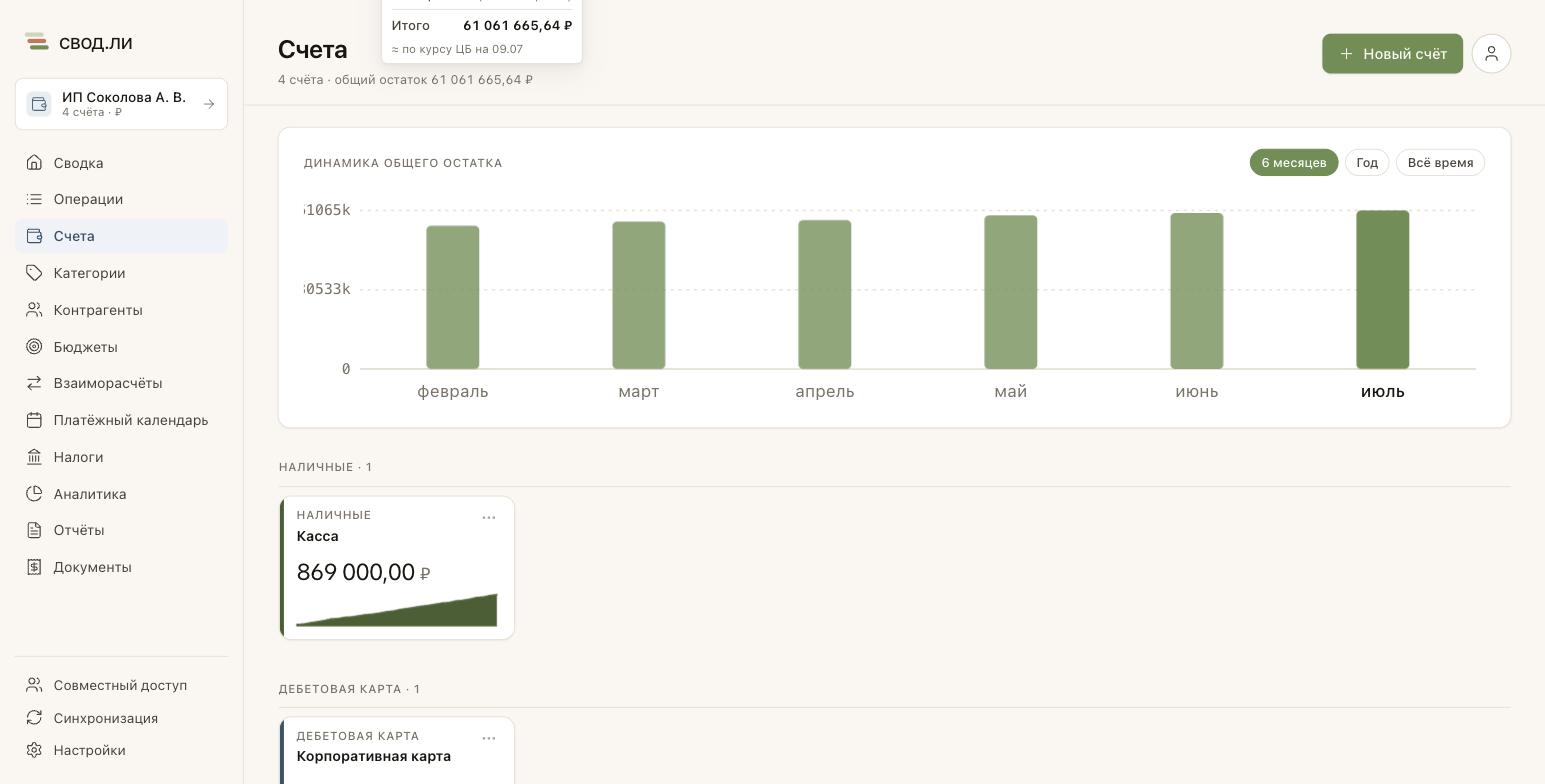
What the total balance is made of
Loans, credit cards and debts go into the total balance as a negative, so a single number easily reads as “I have less money than I really do”. When the total includes loans or debts, the Total balance trend card splits every month into parts:
- Own money — everything that is not a liability: cards, cash, deposits, including a credit card in credit and a debit card in overdraft;
- They owe you — debt accounts where someone owes you;
- Loans — the negative balances of credit cards and loans;
- Debts — debt accounts where you owe someone.
Own money and “they owe you” grow above zero, loans and debts below it, and the month’s total balance is a dot on the line. So you see not only the total but also how the credit card is being paid off and your own money grows. Hover over a month (on a tablet, tap it) to see its parts; the legend under the chart shows today’s amounts. The phone has no trend card — there a “scale” sits under the total balance: a bar that shows what outweighs what, own money or liabilities, with the amounts of the parts.
Loans and debts are separate parts, just like the Loans and Debts cards on Summary, where a bar of the same parts sits under the balance and the amounts show up when you hover over it (on a phone or a tablet — when you tap it). The parts add up to the total balance to the kopeck; with several currencies they use the same CBR rates as the total. The number itself and the statistics do not change. An account kept out of the total balance (below) is not in the parts either. With no loans or debts, the trend shows only the total.
Keep an account out of the total balance and statistics
The total balance is the sum of all active accounts in the book. Loans and credit cards go into it as a negative, so a large loan can push the total below zero, while money set aside for a goal makes it look bigger than what you are ready to spend. If such an account gets in the way of the picture, take it out of the total: its transactions leave the statistics along with its balance.
- Open the account form: on a computer — ⋯ on the account card, on the phone — the “Edit” gear in the header of the account page.
- Turn off “Include in total balance” and save. The toggle is available for a loan, a credit card and a savings account.
The account stays in its group with its balance, transactions and payment reminders, and a crossed-out eye icon appears next to the amount on its card — on a computer, hover over it to see a hint. The account leaves the total everywhere at once: the total balance on Summary and Accounts, the “Total balance trend” chart and the book figure in the list of books. The “N accounts” caption next to the total counts only the accounts that are included.
The account’s transactions also leave the statistics — the same way as transactions tagged “Not counted”: Analytics, income, expense and charts on Summary, budgets and reports. Interest on an excluded loan no longer counts as an expense, and interest on a savings account no longer counts as income.
The rule is the same for a loan, a credit card and a savings account: if you exclude a credit card, its purchases leave the statistics and budgets too. The account’s own balance and transactions, its “Analytics” tab, the journal, the “Loans” group figure, the “Loans” and “Goals” cards on Summary and business book taxes stay as they are.
Archiving and deleting an account
Closed a deposit, gave up a card — it's better to archive the account. Archived accounts disappear from the choices when creating a new transaction, but the history and the balance as of a date remain.
An account can be deleted only from the archive — archive it first, then open it in the “Archived accounts” section and press Delete account. Deletion has thus stopped being a neighbour of the ordinary form buttons: an irreversible action now takes a deliberate step.
When deleting you choose what happens to the account's transactions:
- Delete together with the account — the history disappears. Transfers the account took part in are deleted whole: half a transfer makes no sense.
- Move to another account — the transactions keep their dates and categories, and the opening balance of the deleted account is added to the target one so the balance still adds up.
Its cashback rules and savings goal go with the account. Archiving is almost always the right choice: it is reversible, deletion is not.
Where to go next
A walkthrough per account type — each with videos on creating and using it:
- Cash — withdrawals and deposits as transfers, balance trend.
- Debit card — cashback, statement import, sparkline.
- Bank account — an account without a card and a sole trader’s current account.
- Savings account — goal, rate, calculator, auto-accrual, steps.
- Credit card — limit, two grace mechanics, payoff.
- Investment account — brokerage and IIA.
- Virtual account — an “envelope”, points, technical movements.
- Loan — payment schedule, interest, a payment as a single transfer.
- Debt — direction, handing the money over, due date.
And the neighbouring topics:
- Transactions — how to record income, expenses and transfers.
- Summary — where the balances are visible every day.
- Books — if one book has too many accounts.